React Native
[React-Native]Floating Button 구현
sayhee
2022. 12. 20. 16:32
728x90
상품 리스트를 보다 상품등록을 원할 때 바로 갈 수 있게 플로팅 버튼을 구현해보았습니다!
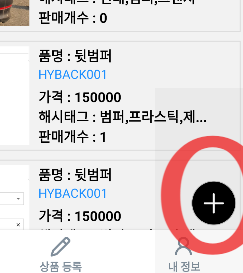
✅ Plus 아이콘 ( AntDesign) 사용
import Icons from 'react-native-vector-icons/AntDesign';
✅ stack class에 이동할 페이지 선언 ( AddGoods)
class Stack extends Component {
    render() {
        return (
            <NativeStack.Navigator initialRouteName="Login"
                screenOptions={{
                    headerTitleAlign: 'center',
                }}>
                <NativeStack.Screen name="AddGoods" component={AddGoods}
                    options={{ title: "" }} />
            </NativeStack.Navigator>
        );
    }

}
✅ 버튼 클릭 시 상품등록 페이지로 이동
<TouchableOpacity style={styles.floatingbtn} onPress={()=>{this.props.navigation.navigate("AddGoods")}}>
    <Icons name='plus' size={30} color='white' />
</TouchableOpacity>
💡 onpress={this.props.navigation.navigate("AddGoods"} 방식으로 할 경우
Warning: Cannot update a component (`ForwardRef(BaseNavigationContainer)`) 의 오류가 뜹니다
동시에 두 개의 렌더링을 수행하려면 다음과 같이 화살표를 추가하면 됩니다
onPress={()=>{this.props.navigation.navigate("AddGoods")}
✅ Floating Button CSS
floatingbtn:{
    borderWidth: 1,
    borderColor: 'rgba(0,0,0,0.2)',
    alignItems: 'center',
    justifyContent: 'center',
    width: 50,
    position: 'absolute',
    bottom: 5,
    right: 10,
    height: 50,
    backgroundColor: 'black',
    borderRadius: 100,
 }