
Notice
Recent Posts
Recent Comments
Link
| 일 | 월 | 화 | 수 | 목 | 금 | 토 |
|---|---|---|---|---|---|---|
| 1 | 2 | 3 | 4 | 5 | 6 | |
| 7 | 8 | 9 | 10 | 11 | 12 | 13 |
| 14 | 15 | 16 | 17 | 18 | 19 | 20 |
| 21 | 22 | 23 | 24 | 25 | 26 | 27 |
| 28 | 29 | 30 | 31 |
Tags
- 알고리즘
- 자동로그인
- React
- vision-camera
- JSON
- react-native
- 순열
- 리액트네이티브
- touchableopacity
- modal
- ReactNative
- 2023년 정처기 필기
- Flatlist
- TextInput
- 가격자릿수
- 페이지리렌더링
- 모달에서뒤로가기
- 리액트
- API
- 뒤로가기구현
- 리액트 네이티브
- 재귀함수
- asyncstorage
- fcm push
- Icon
- fcm 푸시
- algorithm
- makePermutation
- C++98에러
- 모달
Archives
- Today
- Total
생각은 길게 코딩은 짧게
[React-Native] React-Native Icon 적용 본문
728x90
안녕하세요 세히이 입니다 며칠 시도하다 Icon 넣기를 결국 성공시켰답니다...!! 간단한 것이여도 꼬이면 참 힘든 것 같아요 ㅠ ㅠ
먼저 Icon 사용을 위해 npm으로 설치 ( yarn 으로 설치해도 되는데 전 npm을 사용했어요 )
npm install --save react-native-vector-icons
yarn 으로 설치
yarn add react-native-vector-icons
android > app > build.gradle ( 경로 중요 !!!! )

apply from: "../../node_modules/react-native/react.gradle" // 원래 작성되어 있는 코드
apply from: "../../node_modules/react-native-vector-icons/fonts.gradle" // add this line
node_modules > react-native-vector-icons > Fonts 안에 파일들이 있는데 이것을 복사 ( ctrl 누른채로 모두 선택 )
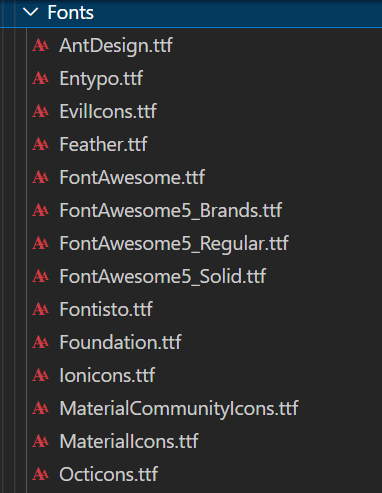
android > app > src > main > assets > Fonts 폴더에 붙여넣기 ( assets 폴더가 없다면 만드시면 됩니다 )

아이콘 import 시켜준뒤 원하는 아이콘 사용
import React, { Component } from "react";
import { View, FlatList, StyleSheet,Text } from 'react-native';
import { NavigationContainer } from '@react-navigation/native';
//Stack 과 Tab
import { createNativeStackNavigator } from '@react-navigation/native-stack';
import { createBottomTabNavigator } from "@react-navigation/bottom-tabs";
//경로를 위한 import
import Product from "./Components/Product";
import UploadProduct from "./Components/UploadProduct";
import Home from "./Components/Home";
//아이콘을 위한 import
import Icon from 'react-native-vector-icons/MaterialIcons';

const Stack = createNativeStackNavigator();//Stack 일 경우
const Tab = createBottomTabNavigator(); //Tab 일 경우
class App extends Component {
  render() {
    return (
      <>
        <NavigationContainer>
          <Tab.Navigator initialRouteName="Home">
            <Tab.Screen name="Home" component={Home} options={{
              title: '홈',
              tabBarIcon: ({color, size}) => (
                <Icon name="home" color={color} size={size} />
              ),
            }} />
          <Tab.Screen name="Upload" component={UploadProduct} options={{
              title: '업로드',
              tabBarIcon: ({color, size}) => (
                <Icon name="person" color={color} size={size} />
              ),
            }}  />
          <Tab.Screen name="Product" component={Product}  options={{
              title: '리스트',
              tabBarIcon: ({color, size}) => (
                <Icon name="list" color={color} size={size} />
              ),
            }} />
          </Tab.Navigator>
        </NavigationContainer>
      </>
    );
  }
}

export default App;
원래 있던 코드에서 추가 시켜준 코드
import Icon from 'react-native-vector-icons/MaterialIcons';options={{
title: '홈',
tabBarIcon: ({color, size}) => (
<Icon name="home" color={color} size={size} />
),
}}https://fonts.google.com/icons?selected=Material+Icons ---> 요기에서 원하는 아이콘 이름을 선택하면 적용됨
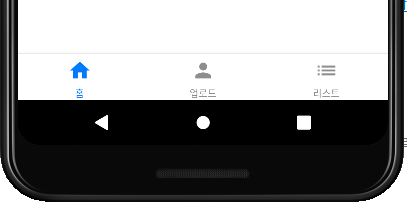
결과
'React Native' 카테고리의 다른 글
| [React-Native] react-native-image-picker (0) | 2022.10.21 |
|---|---|
| [React-Native] 간단한 Modal 구현 (2) | 2022.10.18 |
| [React-Native] React Navigation (1) | 2022.10.13 |
| [React-Native] FlatList로 Json 스크롤해서 보기 (0) | 2022.10.10 |
| [React-Native] Json 파일 가져오기 (0) | 2022.10.04 |
'React Native' Related Articles
more


